Private Sub UserForm_Initialize()
  Dim elem As Object
  Dim Index As Long
  Dim r As Long
  Dim ListBox As MSForms.ListBox
  Set ListBox = UserForm1.ListBox1
  With ListBox
    .Clear  'Listを初期化
    .ColumnCount = 7  '列数と幅を設定
    .ColumnWidths = "30;30;20;30;20;20;20"
    'ListBoxにKeyリストを追加する
    For Index = 1 To table.mycol.Count
      r = Index - 1
      Set elem = table.mycol.item(Index)
      .AddItem elem.ID
      .List(r, 1) = elem.Name
      .List(r, 2) = elem.Age
      .List(r, 3) = elem.Pet.Name
      .List(r, 4) = elem.Pet.Age
      .List(r, 5) = elem.Pet.Types
      .List(r, 6) = elem.Pet.Gender
      r = r + 1
    Next Index
  End With
  SelectedKey = ""  'Public変数初期化
End Sub
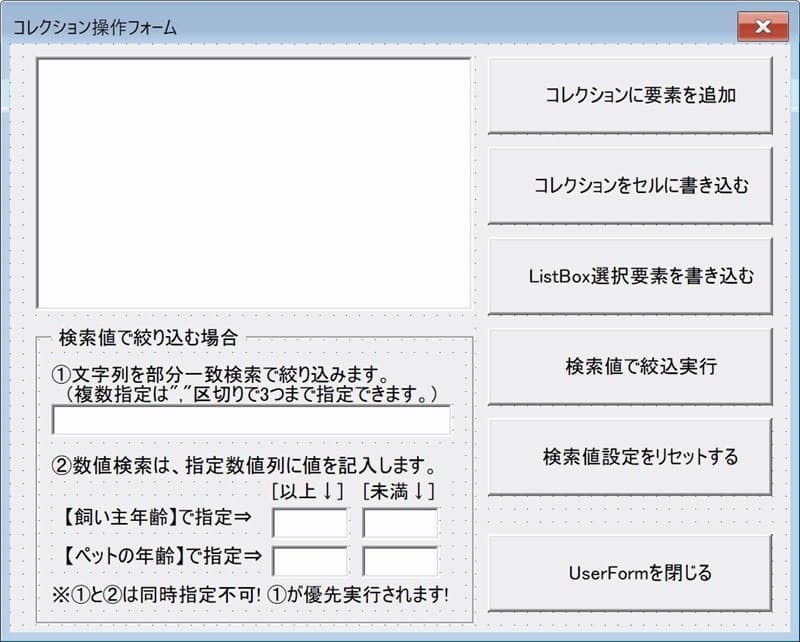
'コレクションに要素を追加
Private Sub CommandButton2_Click()
  Call ColAddItem(table)
  UserForm_Initialize
End Sub
'検索値設定をリセットする
Private Sub CommandButton6_Click()
  Dim Ctrl As Control
  'TextBoxの入力値を全部消す
  For Each Ctrl In Controls
    If TypeName(Ctrl) = "TextBox" Then Ctrl.Value = ""
  Next Ctrl
  '表示を初期値に更新する
  UserForm_Initialize
End Sub
'ListBox選択要素を書き込む
Private Sub CommandButton4_Click()
  With ListBox1
    If .ListIndex = -1 Then
      '未選択の場合は何もしない
      MsgBox "リストが選択されていません!"
    Else
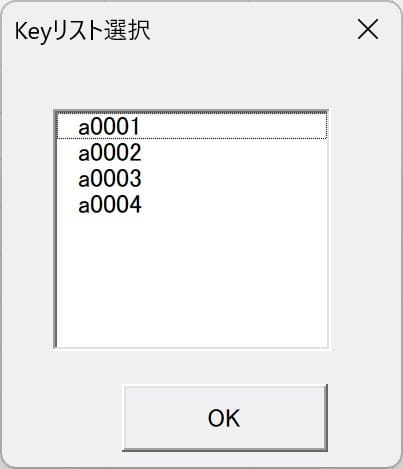
      SelectedKey = .List(.ListIndex, 0)
      Call GetKeyByListBox(table.mycol)
    End If
  End With
End Sub
'検索値で絞込実行
Private Sub CommandButton5_Click()
  Dim elem As Object
  Dim Index As Long
  Dim r As Long
  Dim ListBox As MSForms.ListBox
  Set ListBox = UserForm1.ListBox1
  With ListBox
    .Clear
    .ColumnCount = 7
    .ColumnWidths = "30;30;20;30;20;20;20"
    'ListBoxにKeyリストを追加する
    For Index = 1 To table.mycol.Count
      Set elem = table.mycol.item(Index)
      'フィルタでHITしたItemだけ追加する
      If cFilter(elem) Then
        .AddItem elem.ID
        .List(r, 1) = elem.Name
        .List(r, 2) = elem.Age
        .List(r, 3) = elem.Pet.Name
        .List(r, 4) = elem.Pet.Age
        .List(r, 5) = elem.Pet.Types
        .List(r, 6) = elem.Pet.Gender
        r = r + 1 'Listの行変数に1+
      End If
    Next Index
  End With
  SelectedKey = ""  'Public変数初期化
End Sub
'検索値があったらTrueを返す
Function cFilter(ByVal elem As Object) As Boolean
  Dim sList As String
  Dim str As Variant
  Dim a As Long, b As Long, c As Long, d As Long

  With elem
    If TextBox2.Value <> "" Then a = TextBox2.Value
    If TextBox3.Value <> "" Then b = TextBox3.Value
    If TextBox4.Value <> "" Then c = TextBox4.Value
    If TextBox5.Value <> "" Then d = TextBox5.Value
    If TextBox1.Value <> "" Then
      str = Split(TextBox1.Value, ",")
      '要素内の値を","区切りで繋げる
      sList = .ID & "," & .Name & "," & .Age _
        & "," & .Pet.Name & "," & .Pet.Age _
        & "," & .Pet.Types & "," & .Pet.Gender
      '文字列検索
      Select Case UBound(str)
        Case 0
          '1文字列検索
          If sList Like "*" & str(0) & "*" Then
            cFilter = True: Exit Function
          End If
        Case 1
          '2文字列検索
          If sList Like "*" & str(0) & "*" And _
              sList Like "*" & str(1) & "*" Then
            cFilter = True: Exit Function
          End If
        Case 2
          '3文字列検索
          If sList Like "*" & str(0) & "*" And _
              sList Like "*" & str(1) & "*" And _
              sList Like "*" & str(2) & "*" Then
            cFilter = True: Exit Function
          End If
      End Select
    Else
      '飼い主とペットの年齢で検索
      Dim sCase As String
      If a = 0 Then sCase = "0" Else sCase = "1"
      If b = 0 Then sCase = sCase & ",0" Else sCase = sCase & ",1"
      If c = 0 Then sCase = sCase & ",0" Else sCase = sCase & ",1"
      If d = 0 Then sCase = sCase & ",0" Else sCase = sCase & ",1"
      Select Case sCase
        Case "0,0,0,0"
            cFilter = True: Exit Function
        Case "1,0,0,0"
          If .Age >= a Then _
            cFilter = True: Exit Function
        Case "1,1,0,0"
          If .Age >= a And .Age < b Then _
            cFilter = True: Exit Function
        Case "1,1,1,0"
          If .Age >= a And .Age < b And _
            .Pet.Age >= c Then _
            cFilter = True: Exit Function
        Case "1,1,1,1"
          If .Age >= a And .Age < b And _
            .Pet.Age >= c And .Pet.Age < d Then _
            cFilter = True: Exit Function
        Case "0,1,0,0"
          If .Age < b Then _
            cFilter = True: Exit Function
        Case "0,1,1,0"
          If .Age < b And _
            .Pet.Age >= c Then _
            cFilter = True: Exit Function
        Case "0,1,1,1"
          If .Age < b And _
            .Pet.Age >= c And .Pet.Age < d Then _
            cFilter = True: Exit Function
        Case "0,0,1,0"
          If .Pet.Age >= c Then _
            cFilter = True: Exit Function
        Case "0,0,1,1"
          If .Pet.Age >= c And .Pet.Age < d Then _
            cFilter = True: Exit Function
        Case "1,0,1,1"
          If .Age >= a And _
            .Pet.Age >= c And .Pet.Age < d Then _
            cFilter = True: Exit Function
        Case "0,0,0,1"
          If .Pet.Age < d Then _
            cFilter = True: Exit Function
        Case "1,0,0,1"
          If .Age >= a And _
            .Pet.Age < d Then _
            cFilter = True: Exit Function
        Case "1,1,0,1"
          If .Age >= a And .Age < b And _
            .Pet.Age < d Then _
            cFilter = True: Exit Function
        Case "1,0,1,0"
          If .Age >= a And _
            .Pet.Age >= c Then _
            cFilter = True: Exit Function
        Case "0,1,0,1"
          If .Age < b And _
            .Pet.Age < d Then _
            cFilter = True: Exit Function
      End Select
    End If
  End With
End Function
'検索値設定をリセットする
Private Sub CommandButton6_Click()
  Dim Ctrl As Control
  'TextBoxの入力値を全部消す
  For Each Ctrl In Controls
    If TypeName(Ctrl) = "TextBox" Then Ctrl.Value = ""
  Next Ctrl
  '表示を初期値に更新する
  UserForm_Initialize
End Sub

 くるみこ
くるみこ
 くるみこ
くるみこ